
Claude Code compaction is the reason an AI coding agent can work with you for hours without forgetting what you asked for or burning through your budget. We studied how it works, found that our own version had drifted away from it, and rebuilt compaction in the Aicodesit IDE from scratch. This article explains what we learned, what changed, and what the numbers look like on real tasks.
If you have ever wondered why a long chat with an AI suddenly gets slower, more expensive or forgetful, this is the piece that explains it. No machine-learning background needed.
Why long AI chats need compaction
An AI model does not remember your conversation between messages. Every time you send a message, the whole conversation so far is sent to the model again: your messages, its answers, every file it read and every command it ran. That bundle is called the context, and it is measured in tokens (roughly three or four characters each).
Two things follow from that:
- Every model has a ceiling. The context window is the most the model can read at once, often 200,000 tokens. A long coding session fills it surprisingly fast, because a single file can easily be 10,000 tokens.
- You pay for what is re-sent. Input tokens are billed on every request. A chat that is 150,000 tokens long costs 150,000 input tokens for the next “thanks, now make the button blue”.
Compaction is the answer to both: at some point the old part of the conversation has to be condensed so the chat can continue. The interesting question is how and when, and that is where most tools differ.
How Claude Code compaction works
Before changing anything, we went back to the source. Anthropic documents how Claude Code manages context, and the community has analysed its behaviour in detail. The approach is surprisingly simple:
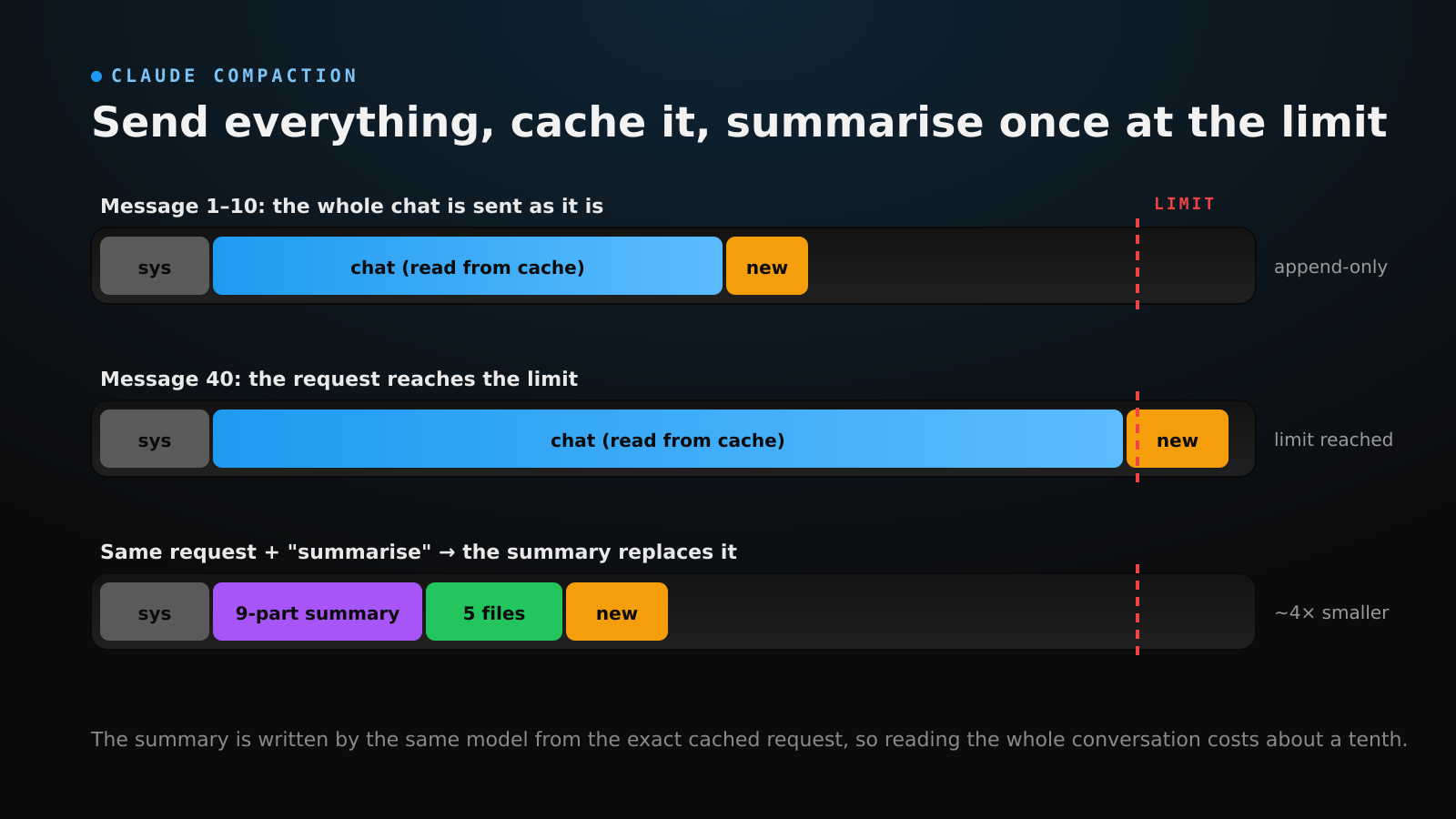
- The whole conversation is sent as it is, every time. Nothing is trimmed or rewritten along the way. New messages are only ever added at the end. That is called append-only.
- Prompt caching makes that cheap. Because the beginning of the request is identical to the previous one, the provider can reuse it from its prompt cache. Cached input costs about a tenth of normal input. So sending “everything” is far cheaper than it sounds, as long as you never change the earlier part.
- There is one compaction point. When the conversation gets close to the limit, it is summarised once. Claude Code keeps room free for the model’s reply plus a safety buffer, and compacts when the conversation reaches the rest.
- The summary replaces the conversation. The model writes a structured summary of everything so far (the community has documented nine sections: the main request, key technical concepts, files and code, errors and fixes, problem solving, all user messages, pending tasks, current work, and the next step). The summary becomes the new start of the chat.
- The files you were working on come back. After compacting, Claude Code re-attaches up to five recently read or edited files. Large ones are listed by name instead, so the model knows to open them again.
- You can do it yourself.
/compactcompacts on demand, and you can add a focus such as/compact keep the checkout details.
The key insight is the second point. Caching rewards you for not touching the past. Every time a tool edits, trims or rewrites an earlier part of the conversation, the cache is broken from that point on and everything after it is paid at full price again.
The mistake we made first
Our first version of compaction tried to be clever. To keep requests small, it stripped older turns once a chat reached 60% of the limit, kept the last three turns in full, trimmed tool results in the middle of long replies, and summarised at 85%. On paper, every step saved tokens.
In practice it fought the cache. Each strip and each trim changed the earlier part of the conversation, so the provider could no longer reuse it. We were saving tokens with one hand and paying full price for them with the other. The project memory had a similar problem: when the AI saved a new memory mid-chat, the start of every later request changed, and the cache started over.
So we threw that logic away and rebuilt compaction the way Claude Code does it.
Claude compaction in Aicodesit, step by step
Claude compaction is now the default in the IDE. Here is exactly what happens with your chat:
1. Everything is sent, nothing is rewritten
Every message, answer and tool result is sent as it happened. The earlier part of the request stays identical from one message to the next, so it is read from the cache. The project memory index the AI sees is frozen for the chat and only refreshed at a compaction, when the cache starts over anyway.
2. One point: your context limit
The limit you choose in the context menu (200K tokens by default) is where the chat is summarised. If the model you use has a smaller window, the point moves down to fit, keeping room for the model’s reply. The ring next to the chat input fills up to that point, so a full ring means the next request gets compacted.
3. The summary is read from the cache
This is the part we are most pleased with. When the limit is reached, we do not send your conversation to a separate summariser. We send the exact same request the AI was about to receive, with one instruction added at the end: write the summary. Because everything before that instruction is identical, the provider reads it from the cache.
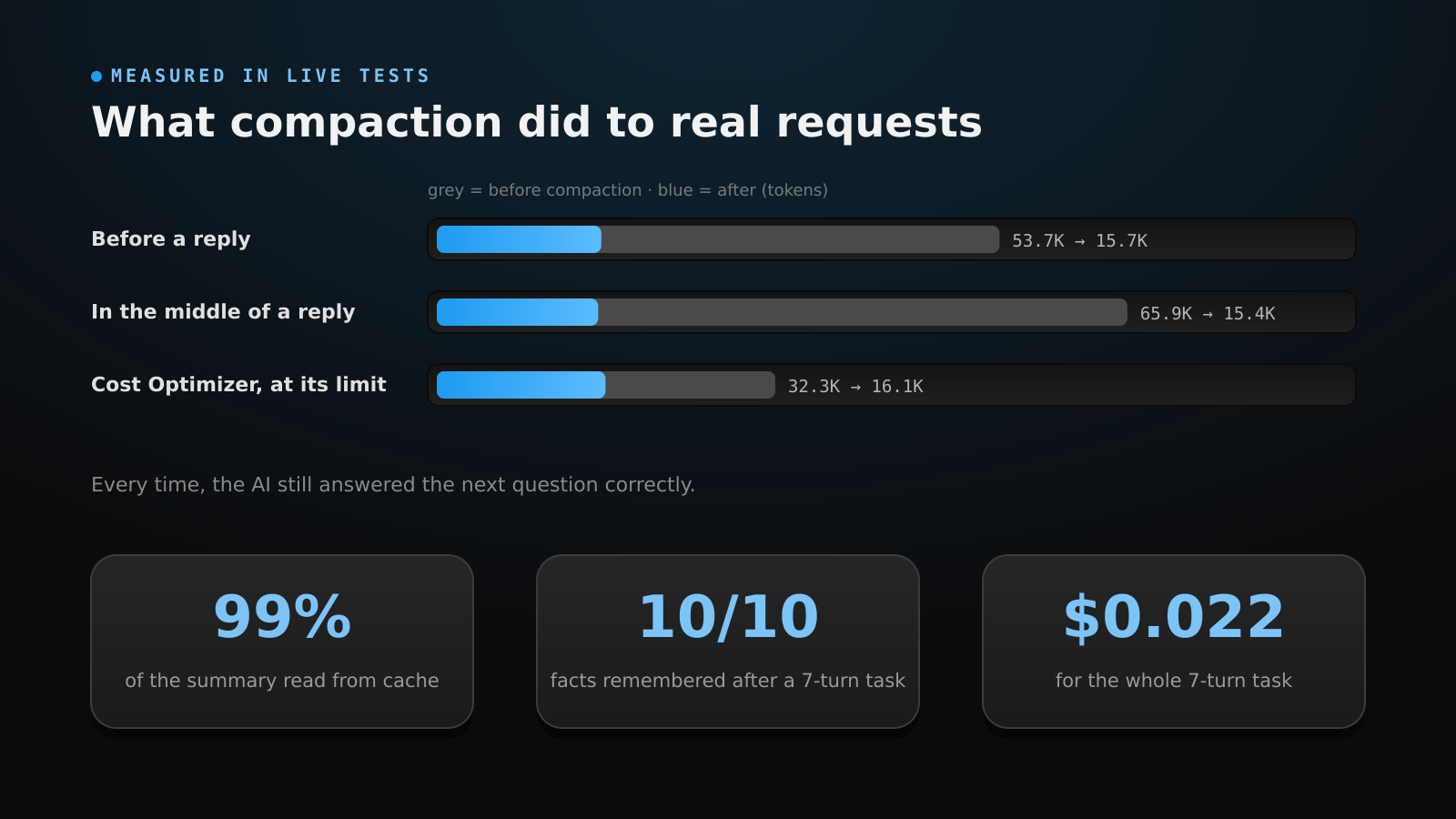
In our tests, 53,630 of the 54,204 input tokens of the summary request came from the cache, and the whole compaction cost about a tenth of a cent.
4. It also works in the middle of a reply
Long tasks are where the context fills up, often while the AI is in the middle of a job: reading files, running commands, fixing errors. Compaction can happen between two steps of a reply. The AI gets the summary and a short note to continue where it left off, and the reply goes on. In one test the AI read four large files in one reply, the chat was compacted twice along the way, and it still gave the exact answer we asked for at the end.
5. Your files come back
After compacting, the AI gets up to five files it recently read or changed, as they are on disk at that moment. Files over about 5,000 tokens are listed by name so the AI can open them again if it needs them.
6. Nothing is deleted
The full chat stays saved. The AI can search it and read any earlier message word for word with its conversation tool, so an exact detail the summary left out is never really gone.
The Cost Optimizer: a second compaction strategy
Claude compaction keeps the most detail, but some sessions are mostly tool output: dozens of file reads, search results and command logs that matter for one step and never again. For those, we added a second strategy you can switch to in the context menu: the Cost Optimizer.
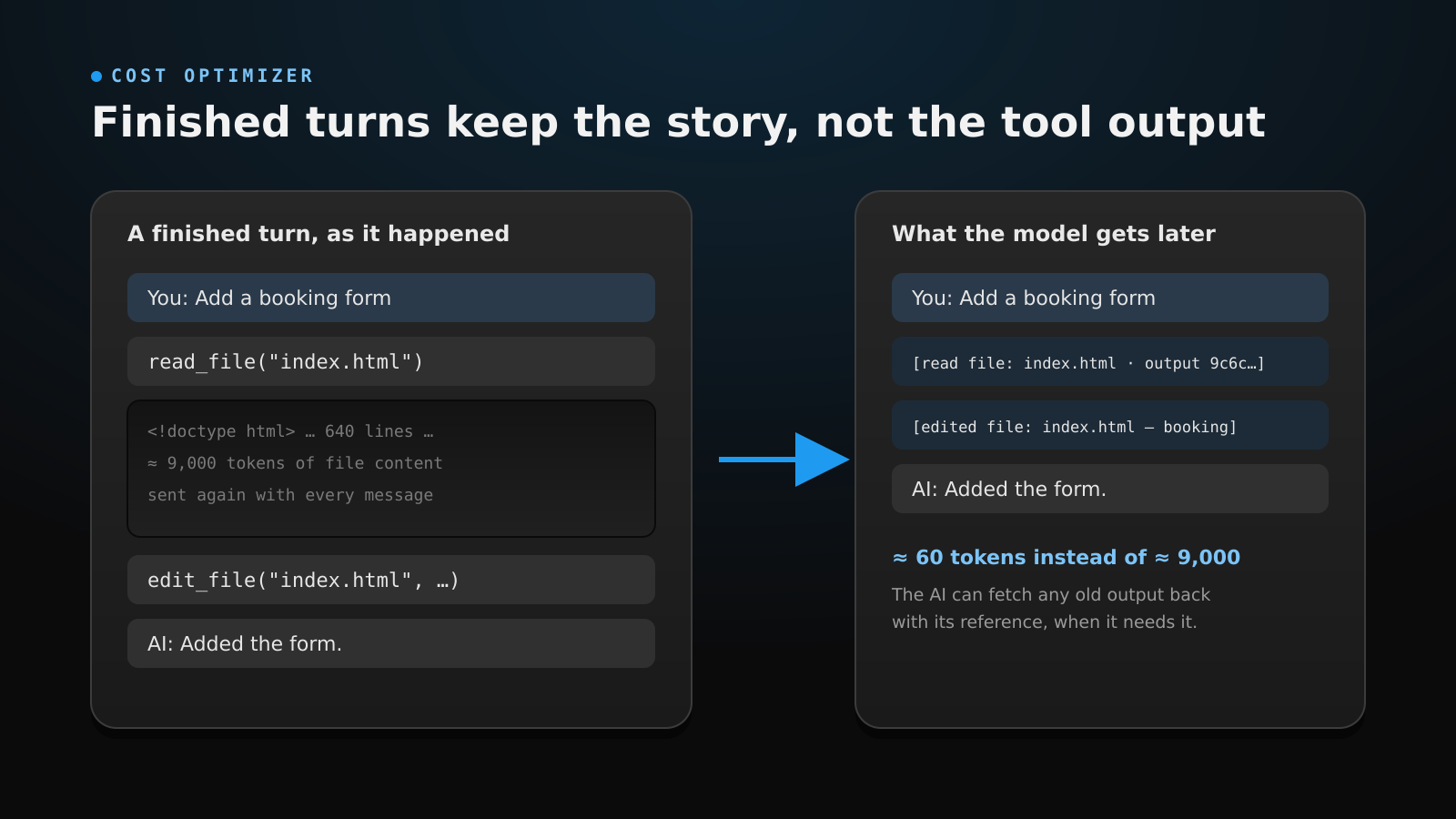
- Finished turns are sent without their tool output. A file read becomes a one-line marker like
[read file: index.html · output 9c6c…]. Your messages and the AI’s answers stay word for word. - The current turn is always complete. While the AI is working on your request, it sees every result it needs.
- Old output is one call away. The reference in each marker lets the AI fetch that exact output back if it ever needs it.
- It still works with the cache. A finished turn is shortened the same way every time, so once it has been shortened it never changes again, and the cache keeps working. In our test, 24,249 of 32,008 input tokens of a Cost Optimizer request were read from the cache.
- Same limit, same summary. When the chat reaches your limit, it is summarised exactly like Claude compaction. Only the file paths are attached, not their content.
Which compaction strategy should you use?
| Claude compaction | Cost Optimizer | |
|---|---|---|
| Old tool output | Kept until the summary | Replaced by one-line markers |
| Detail the AI can see | Everything | Your words and its answers; output on request |
| Request size | Grows to your limit | Grows much more slowly |
| Best for | Careful work where every detail matters | Long sessions with lots of reading and searching |
| Summary at | Your context limit (200K by default) | |
If you are not sure, keep the default. You can switch at any time; the next message simply uses the other strategy.
Does the AI keep the context? A real task
A summary is only useful if the AI still knows what it is doing afterwards. So we tested on a real task instead of a toy example: seven messages building a small bakery website with the Cost Optimizer, at a deliberately low limit so compaction would happen along the way.
- Build a landing page with a brand colour, two fonts and a menu file.
- Add a script that shows the menu with German price formatting (2,50 €).
- Add opening hours, the bakery’s name and a contact email.
- Change one price and add a new item.
- Read a long notes file and find the delivery radius buried in it. The chat was compacted in the middle of this reply.
- Answer nine questions from memory, without opening any file.
- Make one more change that depends on earlier decisions.
The AI answered all nine questions correctly (ten facts checked), including the exact price change from message four and the delivery radius that only existed in a tool output from before the compaction. Every one of the ten checks on the finished files passed. The whole seven-message task cost $0.022, with 74% of all input tokens read from the cache.
The compaction controls in the IDE
Click the ring next to the chat input to open the context menu. Everything is one click away and nothing is in your way:
- The gauge shows how full the chat is, up to the point where it is summarised.
- Compact now summarises right away, with an optional focus. Typing
/compactin the chat does the same. - Compaction switches between Claude compaction and the Cost Optimizer.
- Limit sets where the chat is summarised, from 50K to 1M tokens.
- Summary model and summary prompt let you choose which model writes the summary and edit its instructions.
- What the AI receives opens the exact request, the summariser’s input or the whole conversation in a large window.
- Project memory lists the lasting notes the AI keeps for your project, and lets you edit them.
When a chat is compacted, a small divider appears in the conversation. Click it to read the summary the AI is working from.
Frequently asked questions
Does compaction make the AI forget things?
It condenses them. The summary keeps every request you made, the decisions, the files, the errors and what was being worked on. For anything it leaves out, the AI can search the saved chat. In our task test it got ten out of ten facts right after a compaction.
Does compaction cost extra?
A little, once: the summary is one request. Because it is read from the cache, it is cheap, and every message after it is much smaller, so it pays for itself quickly.
Why not just use a huge context window?
You can raise the limit up to 1M tokens. But every request re-sends the whole context, so a bigger chat is also a more expensive and usually slower chat. Compaction keeps it focused.
Is my full chat history still there?
Yes. Compaction only changes what the model receives. Your chat, every message and every tool result stays saved and visible.
What happens if compaction fails?
If the summary cannot be made, the chat continues as it is and you see a short note. After three failed attempts in a row, automatic compaction pauses for that reply so it never gets stuck in a loop.
Conclusion: send everything, cache it, summarise once
The lesson from Claude Code compaction is that the best way to save tokens is often to stop being clever with them. Send the conversation as it is, let the cache make it cheap, and summarise once, properly, when it is really full. That is how Claude compaction works in Aicodesit now, and the Cost Optimizer is there for sessions full of tool output.
Open a project, start a long task and watch the ring. When it fills up, your chat keeps going.
Keep reading: Long AI Chats Without Forgetting · Aicodesit vs Claude Code: Token Costs · AI Cost Transparency and Budget Limits